Craft Magic with Vector Potion Bottle Illustrations
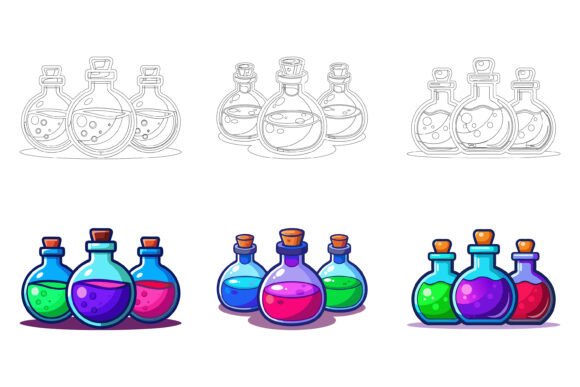
Have you ever wanted a simple yet captivating graphic to sprinkle some enchantment into your projects? The Potion Glass Bottle vector illustration set provides exactly that. It's not just a picture of a bottle; it's a versatile, editable digital asset designed for creators of all levels. Think of it as a clean, scalable drawing of classic potion vessels—complete with cork stoppers, elegant necks, and that iconic glass glow—that you can use anywhere, from a website icon to a printed poster.
What Makes This AI EPS Set a Practical Toolkit
Unlike a standard image you might download from a search engine, this Potion Glass Bottle collection is offered as an AI EPS file. This means the artwork is built in Adobe Illustrator using vector paths. The magic of vectors is that they can be resized to any dimension, from a tiny app button to a large billboard, without losing a single pixel of quality. The crisp lines and perfect curves remain intact. Alongside the editable AI and EPS files, a JPG is included for quick previews or simpler uses, ensuring both Mac and Windows users have immediate access.
The true value lies in the organized structure. Each file is meticulously layered, separating elements like the bottle body, liquid fill, label, and shadows. This isn't a flattened, static image. It's a constructed blueprint. For beginners, this means you can learn how professional graphics are built. For professionals, it means efficient editing—you can turn off a layer to remove the cork, or select the liquid layer to instantly change its color from a mysterious purple to a healing green without affecting the rest of the illustration.
Unlocking Creative Possibilities Across Fields
The applications for this Potion Glass Bottle set are surprisingly broad. Its aesthetic—a blend of fantasy, science, and vintage charm—connects with many themes. A hobbyist blogger writing about homemade herbal teas could use it as a recurring visual motif in their posts. A marketing professional crafting a campaign for a craft soda brand might modify the colors to match their product line and use it across social media graphics.
For educators and freelancers, it serves as a ready-made symbol. Imagine creating an infographic about chemistry safety, using the bottle as an icon for "chemical storage." Or designing a user interface for a mobile game where the bottle represents a health potion; its scalable nature makes it perfect for app development. Small business owners can integrate it into their brand identity—perhaps for a boutique selling mystical candles or a pharmacy emphasizing natural remedies—adding a unique, illustrative touch to their labels, websites, and promotional materials.
Key Considerations for Your Creative Workflow
Before diving in, it’s helpful to understand what this asset requires from you. Since the core files are AI and EPS, having access to software that can read and edit these formats, like Adobe Illustrator or compatible free alternatives (Inkscape, Affinity Designer), is essential to unlock their full potential. The perfection in details and consistency mentioned is a benefit: you get a professionally crafted starting point. However, your own skill with vector software will determine how deeply you can customize it.
The set solves common problems: the hunt for a high-quality, theme-specific icon; the frustration with low-resolution images that blur when enlarged; and the need for a cohesive visual element that can be adapted across different mediums (print and digital). It supports goals of elevating visual content quickly, maintaining brand consistency with a customizable asset, and learning vector design through a well-structured example.
From Idea to Implementation: Realistic Use Cases
Let's walk through a couple of beginner-friendly scenarios. A casual user running a small Etsy store for printable party invitations wants a "magical potion" theme for a Halloween event. They purchase the set, open the EPS file in their software, change the liquid color to a spooky orange, and add a text layer over the bottle’s label area reading "Witch's Brew." They then export it as a PNG and place it into their invitation design. The process is straightforward because the layers are neatly organized.
Another example: a professional designer is working on a series of icons for a client's wellness app. They need a symbol for "natural remedies." They use the Potion Glass Bottle as a base, simplifying it by removing the cork layer to create a more open-vial look, adjusting the hue to a calming blue, and scaling it down perfectly for a smartphone screen. The consistency of the line work ensures it matches the other icons in the app’s suite.
The flexibility is its greatest appeal. You aren't locked into a single look or color palette. You can modify the icon easily according to your needs, making it align with a dark, gothic project or a bright, educational one. This adaptability makes it a cost-effective and time-saving resource.
Why This Collection Stands Out for You
Many graphic packs offer quantity, but lack the thoughtful structure that makes them genuinely useful. The special focus here is on delivering a foundational asset with perfection in details and consistency. Every curve is intentional, every layer is logical. This deliberate craftsmanship means you spend less time fixing a messy file and more time creating. It’s designed to be a reliable component in your toolkit, not just a one-off decorative image.
Whether you're a hobbyist dipping into digital design, a blogger enhancing your visual content, or a professional needing a dependable vector resource, this Potion Glass Bottle set bridges the gap between having an idea and executing it with polished results. It empowers you to craft magic for your own projects, without requiring you to draw the perfect bottle from scratch. So what are you waiting for? This awesome illustration is ready to be infused with your creativity.